Software development
Internal tools and dashboards
Build dashboards, admin tools and portals around the information and tasks your team works with every day.
Before we start. Data access, migration and write actions must be agreed. A dashboard does not make incomplete source data reliable without validation work.
The purpose
Expected outcomes
- A tool organised around the team's daily work
- Clear data sources and access rules
- Checked workflows and a usable handover
Agree the work
Scope and what I need from you
Start with a description. Access to private systems or files is arranged only after the work and handling terms are agreed.
Useful information for the discussion
- Current spreadsheets or process examples
- Who uses and maintains each record
- The decisions or tasks the tool should support
Before the first reply
What I'll ask you.
Internal tools are built around the records and decisions your team already works with.
- How is this handled today?Spreadsheets, email, an existing system.For example: Three Google Sheets updated by hand each Friday
- Who will use it, and who keeps each record up to date?For example: 6 ops staff edit; directors view
- Which decisions or tasks should it make easier?
- Where does the data come from?For example: Xero, our booking system and a shared sheet
- Does anyone need to see less than others?
Explore the process
How the work happens
An illustrated example, from the first request to handover.
An operations team replaces spreadsheet reporting
Use the steps below to inspect the work and expected output.
Step 1 of 4
Understand the records and decisions
Review how the team collects information, checks it and takes action. Identify the source of each important field.
A workflow map and source inventory.
Step 2 of 4
Build around a real task
Create the agreed forms, views and permissions. Show enough context for a person to understand a record before changing it.
A working task flow and role model.
Step 3 of 4
Compare outputs with the source
Test representative records, missing values and conflicting updates. Confirm how the tool reports an error or an unavailable source.
Data checks and recorded workflow results.
Step 4 of 4
Explain everyday use and maintenance
Review the agreed acceptance cases with the team and document data refresh, access and maintenance procedures.
A checked tool and operating notes.
The handover
What you receive.
The agreed handover draws from these deliverables:
- Workflow and reporting requirements
- Responsive dashboard or internal tool
- Data and integration layer
- Access controls, QA and operating guide
Outstanding issues and agreed next steps are recorded with the handover.
Inspect related work
Examples you can review.
ChaseOS
One screen shows what is running, what is waiting for a decision and what needs review, all read live from the system rather than typed in by hand.
The project record includes its current status and verification notes.
Read the ChaseOS project record →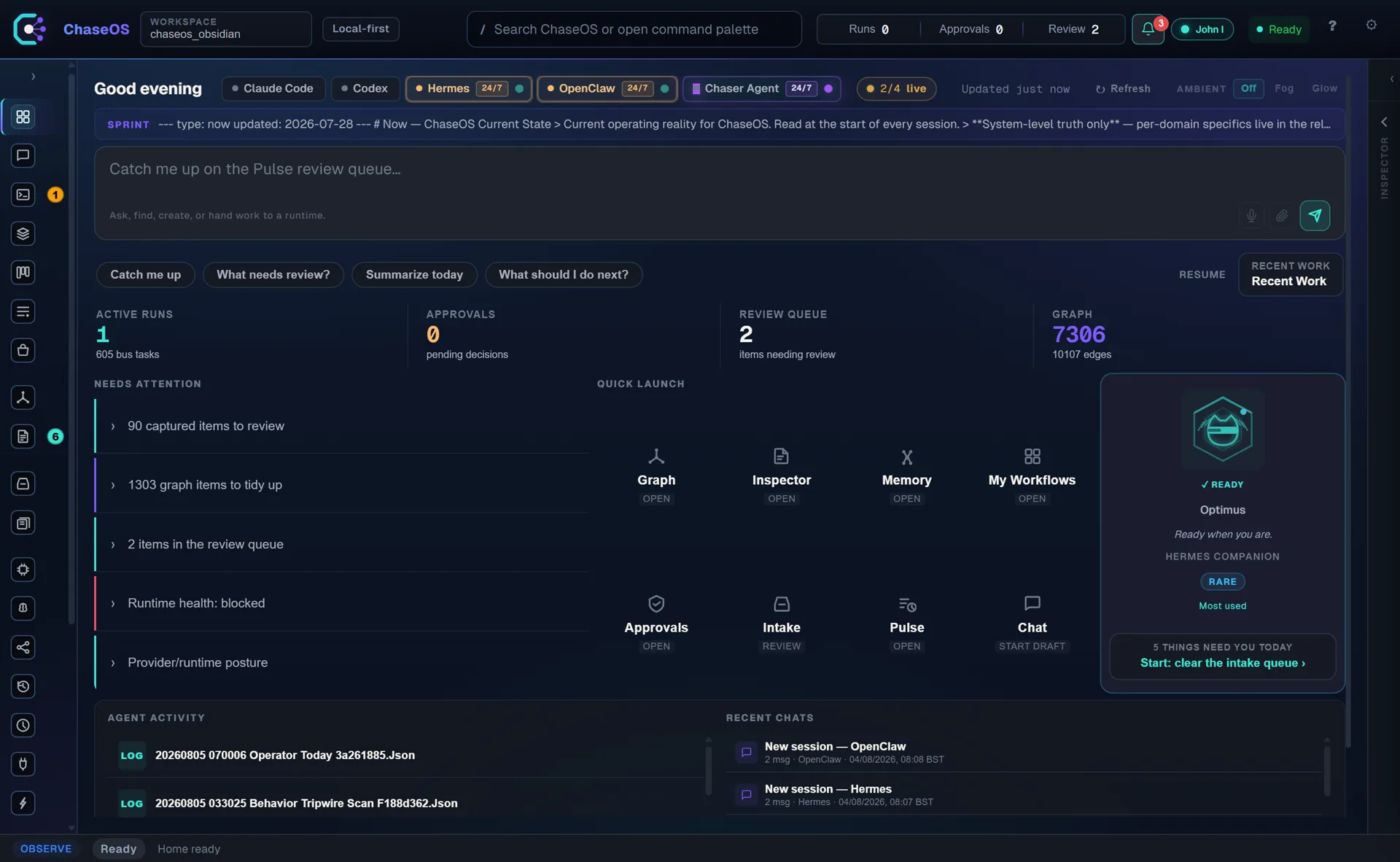
Before you enquire
Common questions.
Can the tool connect to our existing software?
Where the provider offers suitable access and you have the necessary rights. The proposal names the integrations and their limits.
What will you ask me before we start?
Internal tools are built around the records and decisions your team already works with. The 5 questions are listed on this page under "What I'll ask you". You can answer them on the enquiry page, then email or copy the brief.
How is the final price agreed?
The catalogue price is a starting point. The proposal confirms the scope, delivery stages, fees, provider costs and acceptance checks before work begins.
What happens after delivery?
You receive the agreed handover and remaining-issue notes. Additional features, continued operation and support are scoped separately.
Get in touch
Tell me what you need.
Describe the current system, the outcome you want, your timeline and a rough budget. Do not include credentials or private files in the initial enquiry.