Personal Command
Everything you run, on one live map.
Every computer, AI tool and agent you rely on, watched on your own machines. You hear about a problem by email before it costs you, read one report a month, and ask how things are in a sentence.
It works with whatever AI you already use.
Real footage · narrated · 58 seconds
A day with Personal Command.
Today's priorities waiting when you open it, the week planned in one place, an agent asked in plain words, the exact words approved before anything goes out, and every computer and agent on one live map.
Try it yourself
A live map you can play with.
This is the same kind of map Personal Command keeps for you. It opens on one modelled on my own setup, with the names and numbers changed. Run the fault drill and watch the alert emails arrive underneath, run the review to see what a check finds, or choose another kind of business.
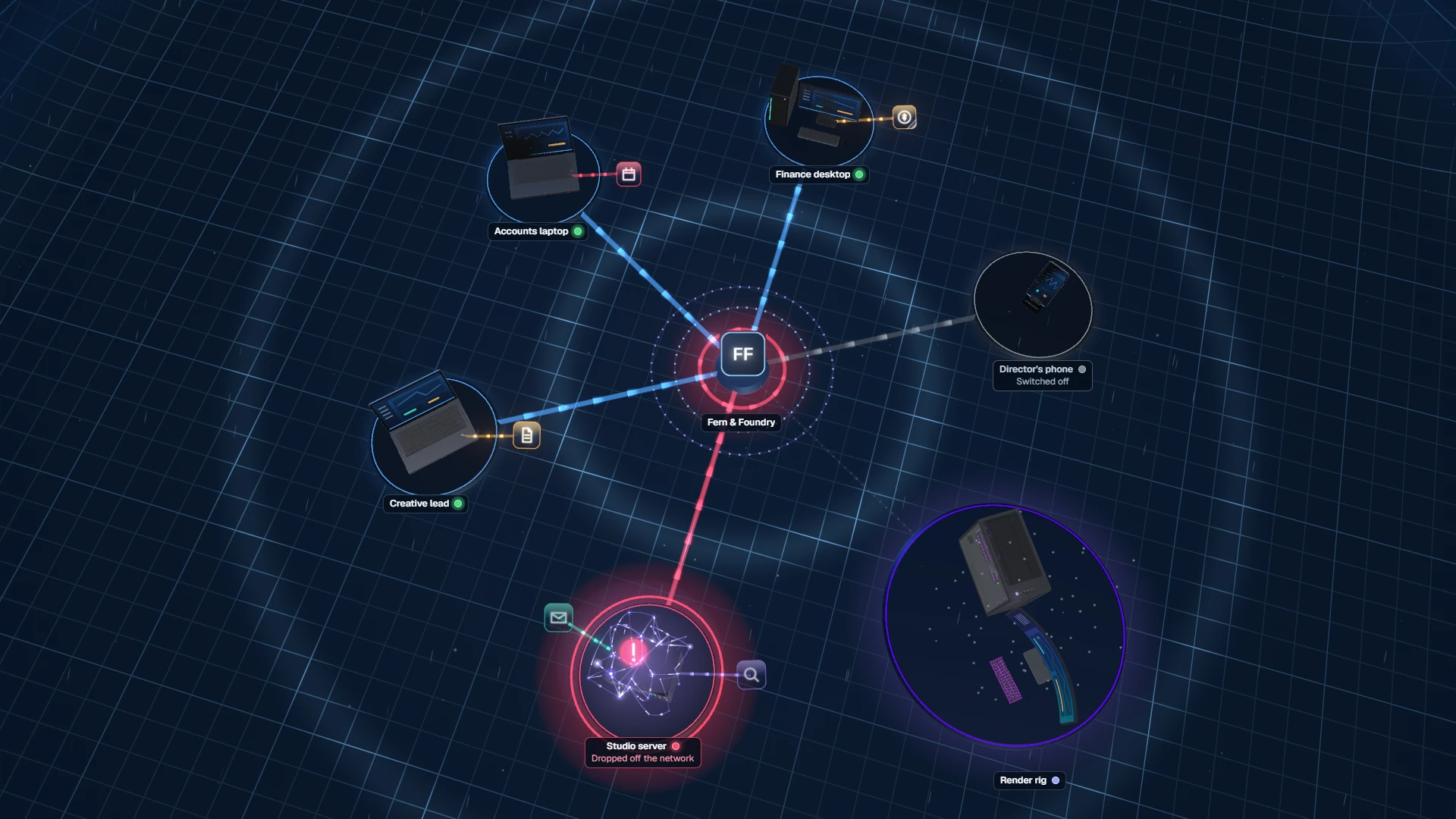
The 3D map isn't available in this browser. The numbers and findings still describe the sample company.
- Machines
- 0
- AI agents
- 0
- Agent actions logged
- 0
- Open risks
- 0
What the review found
Your inbox
Example emails from this demo, sent the moment the map changes.
Nothing yet. Press Fault drill on the map, then Bring it back.
What you're looking at
- Computers
- Each one drawn as what it is, with a small dot for its connection. Only something actually broken turns red. Something switched off on purpose stays grey.
- Agents
- The tiles around a computer. Choose one to see its job, what it did this month and who approves its work, whether that's answering email, cutting videos or writing code.
- Knowledge graph
- The glowing cloud above a computer. It's your notes, files and saved sources joined up by what they're about, so an agent can find the right fact and show where it came from. The map shows which agents read from it. How the knowledge graph works →
- Dim and dashed
- Anything that hasn't been confirmed, or a machine that's only planned. The map never shows a guess as working.
Faster content, from every device
Shoot on whatever's in your hand. Personal Command brings it all to one library, and the content engine turns your real footage into a finished, narrated film you can post the same day.
Real footage · narrated · 32 seconds
From your phone to a finished film.
A phone paired once over your private network, a batch of photos and a clip sent at full quality and checked on arrival, the files waiting in your library under that phone's name, and a narrated film the content engine cut from real footage.
Capture on any device
Pair each phone or tablet once with a code. Photos, clips, documents and links go over your own private network at full quality, up to 100 at a time. On a laptop, drop files straight into the library.
Checked and filed for you
Every file is checked for safety as it arrives and filed under the device that sent it and the month, so a shoot from this morning is waiting at your desk.
Cut from your real footage
The content engine picks the scenes, frames them, adds a narrated voiceover, subtitles and music made for the film, and puts the finished cut in your library.
You approve, then it goes out
Publishing stays your decision. Captions and replies your agents draft wait for your yes, with a receipt for each.
Real footage from my own setup, where it runs every day. Content capture and the content engine are added to your set-up when your written scope includes them.
Works with the agents you already run
You don't switch tools. The coding, writing and research agents you already use keep working the way they do now, and Personal Command gives them one board, one place to approve their work and a receipt for everything they do.
Real footage · narrated · 35 seconds
Your agents, on one board.
Coding, writing and research agents on one board across your computers: hand work over in a sentence, accept what an agent suggests, see what each is doing, approve the exact words, and pause any of them from your phone or tablet.
- Keep the agents you use
- Coding agents, writing agents, research agents and your own scripts each get a lane on one board, on whichever computer they run.
- Hand work over in a sentence
- Type what you want and who should do it. The card lands in that agent's lane, on the right computer, and you watch it move from Ready to Working to Needs you.
- The exact words, before anything goes out
- When an agent finishes, you read its draft and approve or decline it from your desk, phone or tablet. Every decision is kept as a receipt.
- Work that moves between computers
- Send a job from your laptop to a computer that's always on. It wakes it first where it can, and comes back by itself if nobody picks it up.
Shown on my own setup. The board and approvals come to your set-up with the approval inbox listed under Coming.
How people use it
Three ways it fits a working week, using what Personal Command does today. Anything still on its way is marked as coming.
What it does for you
One live map
Every computer, AI tool and agent you run, on one map you can take in at a glance.
- See what's working, what has gone quiet and what has come back.
- It works with whatever AI you already use. It isn't tied to one assistant or one company's agents.
Real footage · my own setup
Told the moment something stops
When a computer or agent drops off, it turns red and you get an email, even if the internet or the power goes down where it runs.
- When it comes back, the map shows it healed, and the report records how long it was down.
Real footage · my own setup
Add a computer with a code
Your laptop, or another computer in the office, joins with a one-time code from your main computer. There's no account to make, no key to copy and nothing for an IT provider to configure.
- From then on, if it goes quiet for ten minutes you get one email, and another when it's back, even when it's switched off.
- Stop watching one with a click on your main computer.
On your main computer: Add a computer
K7M2–QX9P
On the laptop: Add this computer, then type the code
Laptop added and watched from outside
Example
Ask in a sentence, or out loud
No menus to learn. Ask it the way you'd ask a person, at your desk or by voice.
Real footage · my own setup
Readiness, checked from each computer
The five Cyber Essentials controls and the questions cyber insurers commonly ask, answered from each computer's own settings, with the fix for every gap.
- This prepares you for Cyber Essentials and insurance forms. It isn't a certification, and it doesn't replace one.
Real footage · my own setup
Decoy files
Files nobody should ever touch, placed among your real ones. Opening, moving or changing one raises an alert straight away.
- That catches a person looking where they shouldn't, malware working through your files, and AI agents following instructions hidden inside a document.
Real footage · my own setup
Backups you know will restore
Daily backups, and a restore check every week to prove they come back.
- Optionally, an encrypted copy in your own OneDrive, Google Drive, Dropbox or network drive. Only your recovery key opens it: not me, and not the storage provider.
Real footage · my own setup
Updates that look after themselves
Personal Command checks for its own updates. If one goes wrong, it goes back to the last working version on its own.
- Try an update on one computer first, then the rest. Hold one, or roll it back, by saying so in a sentence.
Real footage · my own setup
Email alerts that respect your evenings
Tell it where to send them. Anything red reaches you straight away, even when the internet or the power is down where it runs.
- Quiet hours hold anything that can wait until the morning.
From Personal CommandOffice PC stopped responding at 14:05It hasn't checked in for ten minutes. You'll get another email when it's back.
Example
Coming An approval inbox, where an agent asks you before it acts and waits for your answer.
Coming Its own always-on agent, included in the monthly plan. It drafts, sorts and follows up, asks before it acts and keeps a receipt for everything it does. Already use an AI assistant? Keep it: Personal Command works with it.
For your kind of business
The same Personal Command, set up around how you work. Each one opens its own example on the map above.
Just you, running a business with AI
One person, a few computers and agents that keep working after you stop: editing, drafting replies, reading what you've saved. There's no second person to notice when something quietly stops.
- An email the moment a computer or agent stops, and another when it's back
- One report a month you can read in five minutes
- Decoy files that catch an agent following instructions hidden in a document
Founders shipping with AI agents
Coding and support agents work overnight on the product and your customers. A key in the wrong folder or an agent promising refunds can cost more than the month's revenue.
- Every agent's job, what it did and who approves it, on one map
- Backups with a restore check, so you know you could recover
- Hold or roll back an update with a sentence
Agencies and studios
AI tools arrived one person at a time. Now the people you work for ask how their files are handled, and nobody can say who can reach what.
- A monthly report with your firm's name on it, ready to share
- Any change that widens access to shared work flagged as it happens
- Readiness answers for the security questions customers send you
Accountants, solicitors, advisers and clinics
Small teams with serious duties to keep records confidential, who need to show who can reach what, and an insurer or regulator who will ask.
- The five Cyber Essentials controls checked from each computer's own settings, with a fix for every gap
- Answers to common cyber insurance questions, from the machines themselves
- Preparation for Cyber Essentials, never a claim of certification
Online shops
Tills, warehouse machines and agents that can spend money, usually on one shared network. A stopped stock agent can mean a sold-out best seller by morning.
- An alert when the warehouse PC or the till drops off
- Agents that spend money shown with who approves them
- Daily backups of the computers that run the shop
IT support companies
You already look after other firms' computers. Personal Command gives each of them a clear map and report, and gives your engineers one place to see what stopped.
- A report per firm you look after, in their name
- Updates tried on one computer first, rolled back on their own if they fail
- Hands-on work stays with you. I supply the map and the reports
Setting it up
From first question to running on its own. You stay in control of every computer the whole way through.
Try the self-check, or talk to me
Six questions and a price guide, free, with nothing sent anywhere. Or book a call and we'll go through your setup together.
The access check
A fixed price, agreed in a written scope and permission letter before anything starts. It finds what your AI tools and agents can reach, and gives you a ranked list of fixes.
Setting it up, the way that suits you
- On a video call
- You install it yourself while I watch your shared screen and guide each step. I never take control of your computer, and nothing is left behind that lets me back in. Beforehand you get a note saying how to tell it's really me.
- With your IT provider
- They put it on your computers the way they already install software, and I set up the map and the report with them.
- In person
- For firms in and around London, at your office. One visit is already included in a firm's check.
Handover
It runs on your machines and belongs to you. You get a short guide, the report set up the way you want it, and written confirmation that my access has been removed.
From then on, it looks after itself
Updates check themselves, go to one computer first and roll back on their own if something's wrong. Backups run every day with a restore check every week. You can hold or roll back an update just by saying so. Adding another computer later takes a one-time code from your main one, typed on the new computer.
Your report, every month
Both editions do everything above. The difference is who it's written for: you, or your firm. A short summary also arrives every Monday. Print the report, save it as a PDF or have it emailed.
Real footage · narrated · 30 seconds
How your report is made.
Ask what changed and get an answer from the records it keeps. The same records become one plain report a month, or a week, ready to print, save as a PDF or have emailed.
October · example report, invented figures
Your monthMonthly report for Harper & Lane
Written to you, about your own computers, phone, accounts and AI tools.Carries your firm's name, ready to print for a partners' meeting or pass to your IT provider.
- Alerts
- 2 alerts, both fixed within 20 minutes7 alerts across 14 computers, typical fix 18 minutes
- Updates
- 1 update, tried first on the desktop, then the laptop2 updates, one held for a week at the partners' request
- Backups
- 31 of 31 daily backups · 4 restore checks passed31 of 31 daily backups · 4 restore checks passed · encrypted copy in your own drive
- Readiness
- 4 of 5 controls met · 1 fix waiting13 of 14 computers meet all five controls · 1 fix waiting
- Map changes
- Flagged: a new AI tool can now read your emailFlagged: a new AI tool was given access to the shared case files
How it stays safe
Real footage · narrated · 36 seconds
Nothing goes out until you say yes.
The exact words of every agent request, a receipt naming the screen behind each decision, decoy files among your real ones, updates that wait for your yes, and one hold on your phone to lock everything down.
- It runs on your machines. Nothing is sent to me or anyone else.
- When its own agent arrives, only what a task needs goes to ChaseOS Cloud, and every request is metered and receipted.
- It stores no passwords or keys.
- It only shows what your systems already report, and anything it can't confirm stays dim until it can.
AI tools and agents can get things wrong or act unexpectedly. You decide what each one may do and which actions need your approval, and the tools you connect stay under their makers' own terms. How AI tools and agents are covered.
I run Personal Command on my own systems every day. See this week's work record: what my agents did, and what I signed off.
What it costs
You pay once for an access check and set-up on your own machines, then one monthly plan keeps it running. For one person that's £694 to start, then £29 a month. The first 30 days of the monthly plan after set-up are free. Every price is fixed in a written scope before any work starts, and no VAT is charged.
Just youIntroductory price
One person's computers, phone, accounts and AI tools
Each month
£29£29
About 1,500 agent tasks a month, when the agent arrives
Paid once, before the plan
- Access check
- £199£199
- Set-up
- £495£495
- To start
- £694£694
Prices for one person are the same in any line of work.
2–10 people
A small team
Each month
£249–£349£375–£525
About 10,000 agent tasks a month, when the agent arrives
Paid once, before the plan
- Access check
- £1,250–£2,500£2,000–£3,500
- Set-up
- From £6,500From £9,500
- To start
- From £7,750From £11,500
11–25 people
A growing firm
Each month
£495–£795£745–£1,195
About 25,000 agent tasks a month, when the agent arrives
Paid once, before the plan
- Access check
- £3,000–£5,000£4,500–£7,500
- Set-up
- Quoted after the checkQuoted after the check
26–50 people
An established firm
Each month
£895–£1,450£1,345–£2,175
About 50,000 agent tasks a month, when the agent arrives
Paid once, before the plan
- Access check
- £5,000–£8,500£7,500–£12,000
- Set-up
- Quoted after the checkQuoted after the check
Checks for a firm include one office visit within Greater London; further visits are charged at the visit rates in your scope. Firms of 11 or more have set-up quoted after the check, and more than 50 people are quoted after a free call.
What the monthly plan is
- What you're paying for
- A licence to use Personal Command on your own computers, for your own purposes, with every update, for as long as your plan runs. Personal Command itself remains ChaseInTech's. Your data, and the maps, reports and findings made for you, are yours.
- What's included
- Updates, the live map, email alerts when something stops, your monthly report and Monday summary, daily backups with a weekly restore check, decoy files and readiness answers, as set out in your scope. Its own agent and monthly task allowance join the plan when the agent arrives.
- How it's paid
- After set-up, the first 30 days of the monthly plan are free. After that, it's paid monthly in advance at the price fixed in your scope. No VAT is charged.
- If you cancel
- Either of us can end the plan with 30 days' written notice. When it ends, Personal Command keeps working on your computers read-only, without updates, or you can uninstall it. My access is removed and confirmed in writing.
The monthly plan in full: support, missed payments and your rights →
If you'd like a person to look over it too, a quarterly re-check shows what changed, from £150 a quarter for one person to £1,250 for up to 50 people. Hands-on help is agreed with you, and with your IT provider if you have one. There's no out-of-hours cover.
Start Personal Command
Tell me what you run. I'll scope your set-up.
Answer what you can. Your answers become one short brief you send from your own email, or bring to a free call. A written scope with the fixed price comes back before any work starts. Ready to pay now? Choose a plan above.
Before you start
Questions people ask
- How much does Personal Command cost?
- For one person, you pay £694 once, for the access check (£199) and set-up (£495), then £29 a month. For a firm of 2–10 people, the check is £1,250–£2,500 and set-up from £6,500, then £249–£349 a month. Monthly plans go up to £1,450 for 26–50 people. Law, accountancy, financial advice and health firms pay about one and a half times, from £375 a month. Every price is fixed in a written scope before work starts, and no VAT is charged.
- What does Personal Command do?
- It puts every computer, AI tool and agent you run on one live map, on your own machines. It emails you the moment something stops, sends a report every month and a summary every Monday, runs daily backups with a weekly restore check, places decoy files that raise an alert when touched, and checks the five Cyber Essentials controls from each computer's own settings.
- How long does it take to set up?
- The access check comes first and takes 1–2 working days for one person, or 3–5 working days for a firm of 2–10 people. Set-up follows, on a video call, with your IT provider or in person at offices in and around London. Once it's running, it looks after its own updates and backups.
- How do I pay for Personal Command?
- The access check can be paid online. Set-up is priced in your written scope and paid by invoice. After set-up, the first 30 days of the monthly plan are free; after that it is billed monthly in advance at the price agreed in your scope. Prices are in pounds sterling, and no VAT is charged.
- Can I cancel the monthly plan?
- Yes. Either of us can end the plan with 30 days' written notice. When it ends, Personal Command keeps working read-only on your computers, or you can uninstall it, and my access is removed and confirmed in writing.
- Does my data leave my computers?
- No. Personal Command runs on your own machines and doesn't send your data to me or anyone else. It stores no passwords or keys, and it only shows what your systems already report.
- Is it a Cyber Essentials certification?
- No. It answers the five Cyber Essentials controls and common cyber insurance questions from each computer's own settings, with a fix for every gap. That prepares you for Cyber Essentials and insurance forms, but it isn't a certification and doesn't replace one.
Want the full check for your business? Try the free self-check or see the access check among the other services.