ChaseInTech Digest
Stop Clicking Through Menus: ChaseOS Studio Now Takes a Sentence
How the ChaseOS Studio top bar routes a plain sentence to the right panel through ChaseOS Cloud, fills in its form, offers the next step in Chat, and still never submits anything on its own.
A workspace should understand what you need from one sentence, and still wait for you before anything happens.
ChaseOS Studio has a lot of panels: Approvals, Capture, Missions, Research, Audits, Routines and more. Each one does a real job, and each one used to need you to find it, open it and fill in its form. That was the slowest part of using Studio, and it’s the part I’ve just replaced.
Why it started
My Codex plan ran out for the week. Studio’s own agent, Hermes, runs on that plan, so instead of waiting for the reset I gave Studio a ChaseOS Cloud key. The key sits in Studio’s encrypted vault, and ordinary chat, form drafts and top-bar routing use it while native Hermes is unavailable. Once the agent was running again, I turned it on the friction I hit every day.
One sentence in the top bar
Type “sort out whatever is waiting on my sign off” into the top bar. That sentence names no panel, so keyword matching can’t route it. Studio sends the sentence to ChaseOS Cloud with the catalogue of panels and actions that page actually offers. The model chooses one, and Studio opens it. In the recording, Approvals opened about four seconds after Enter.
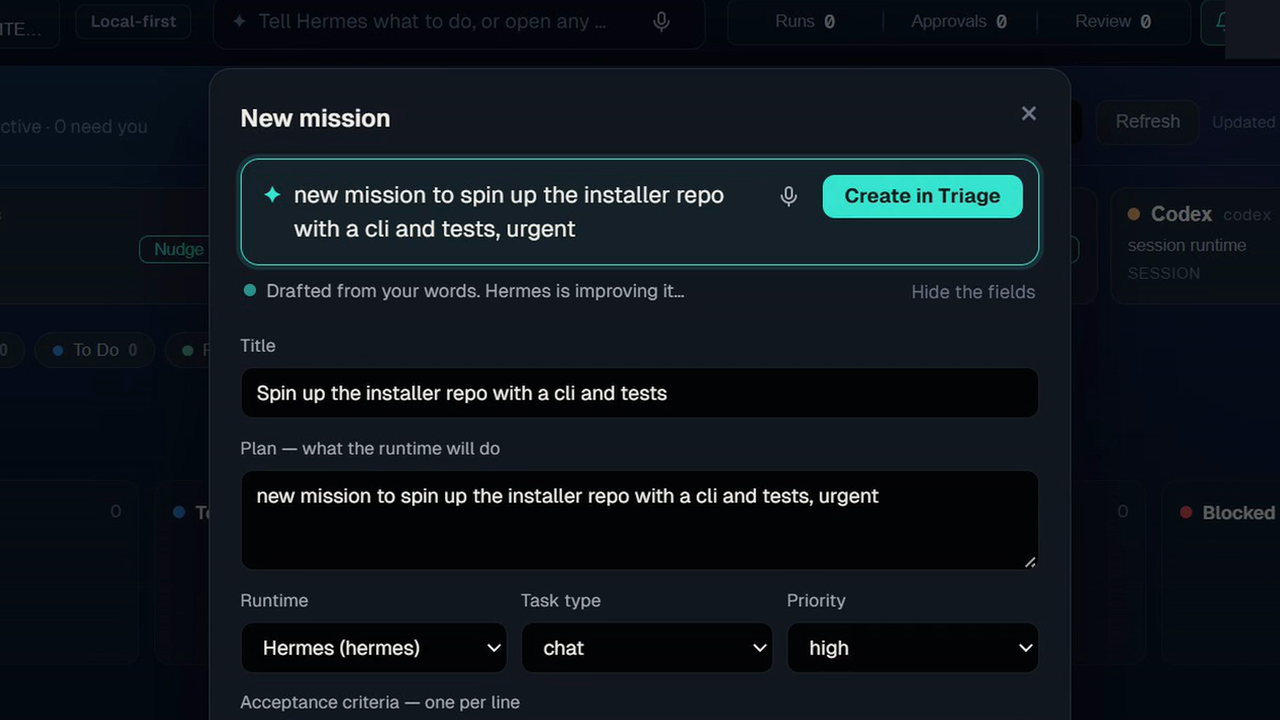
The same route covers actions, not only panels. “Jot down that the launch moved to Friday” opens Capture with the note already in place. “New mission to spin up the installer repo with a CLI and tests, urgent” opens the New mission form with its title and plan filled in. When the request is to create, schedule or remind, the model is told to pick the action that makes the thing, so a recurring reminder goes to Routines rather than to a search.
The model can only choose from the catalogue it’s given. It can’t invent a panel. If its answer doesn’t name something on the list, the top bar does what it did before and hands the sentence to the agent.
The next step, one press away
Chat replies can now carry the next step. The model writes a small marker, such as an instruction to open Approvals, and Studio renders it as a button under the reply. Chat transcripts are rendered as Markdown, which turned the markers into wiki links at first, so Studio now handles both forms. In the real Chat screen, a Cloud reply came back in 12 seconds through chaseos/balanced. It said plainly that it couldn’t see the live approval queue, offered an Open Approvals button, and the button opened the panel.
What the agent can’t do
Most of the engineering went into the limits.
Nothing submits itself. While reviewing my own QA footage, I caught the top bar pressing a form’s own submit button for three actions. Now only a trusted event, meaning a real key press or click from the person at the keyboard, can confirm a form. A sentence, a model reply or text echoed from a file can open a form and fill it, never submit it. A test that failed on the old code now guards it.
Mail stays local. Anything that looks like mail goes to the reviewed native route and never to Cloud. That rule tightened after a test about mail accounts slipped past a whole-word match. The model then answered with identities it could not have seen. The check now matches inside words, and the guide the model works from tells it never to invent live details. It now says when it can’t see something.
Gateways fail. Cloud gets one retry after a 502, 503, 504 or timeout. If it still can’t answer, Studio falls back to native Hermes. A stale “plan exhausted” record no longer blocks that attempt; it’s used only to explain a failure.
What this does and doesn’t show
It’s one machine, recorded on 2 November 2026. The routing picks from a known list of panels rather than doing whatever it likes. The final test run behind the recording passed 46 of 46 tests. These changes are in the ORITECHNE build of Studio and land in the next release, not the Studio 1.2.0 download on chaseos.ai today.
ChaseOS is for founders, consultants and builders whose projects outlast one conversation. If you want sentence-driven, approval-bound workflows like this inside your own tools, that’s the work I take on: chaseintech.com.